How to work with agent sessions
The workspace's coding agent (OpenCode unless agent selects another, see Choose a coding agent) runs in a session inside the workspace VM, reached over SSH. Sessions outlive your terminal: you can detach, re-attach, run several at once and stop them from outside.
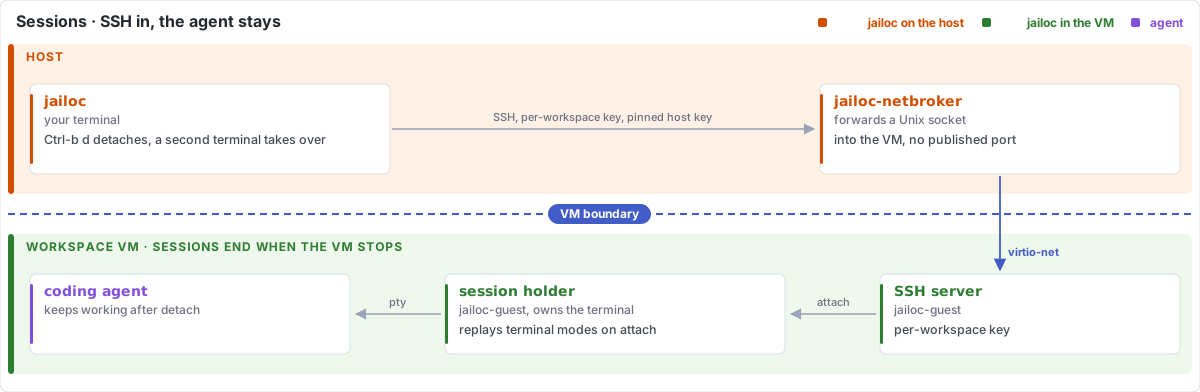
Start or attach to a session
From a directory inside a workspace path, run:
jailoc
jailoc picks the workspace that contains the current directory, starts the VM if needed and opens the agent in that directory. If a session is already running, jailoc attaches to it and redraws the screen. If the directory belongs to several workspaces equally, jailoc asks you to pick one with -w.
To name the workspace or directory explicitly:
jailoc -w my-project
jailoc ~/projects/my-project/src
Running jailoc from a second terminal takes the session over and detaches the first terminal.
Detach
Press Ctrl-b, then d, or close the terminal window. The agent keeps working. Run jailoc again to come back.
To send Ctrl-b to the agent itself, for example to background a task in Claude Code, press Ctrl-b twice.
Change the detach keys
If Ctrl-b clashes with your tmux prefix or is awkward on your keyboard layout, set other keys in ~/.config/jailoc/config.toml:
detach_keys = "ctrl-a,d"
Or for one session:
jailoc --detach-keys 'ctrl-\'
See detach_keys for the key syntax.
Start another session
jailoc --new
This opens a second session next to the running one, for example to run a dev server while the agent works.
Continue an earlier agent conversation
jailoc -c              # continue the last conversation
jailoc -s <session-id> # continue a specific conversation
These flags are passed to the agent (for example --continue and --resume <id> for Claude Code) and refer to its conversations, not to running jailoc sessions.
List and attach to running sessions
jailoc sessions -w my-project
Then attach to one by its ID:
jailoc --attach <ID> -w my-project
Stop a session
Quitting the agent ends the session. To end it from outside:
jailoc sessions stop <ID> -w my-project
jailoc down ends every session of the workspace.
Read workspace logs
jailoc logs my-project      # print the VM supervisor and guest console logs
jailoc logs my-project -f   # follow them
For log locations and common failures, see Troubleshooting. For every flag, see CLI reference.