Architecture
Each workspace runs in its own libkrun micro-VM. This page describes the processes on the host, what happens inside the guest, how files and the network reach the VM, and how images are built.
Host processes
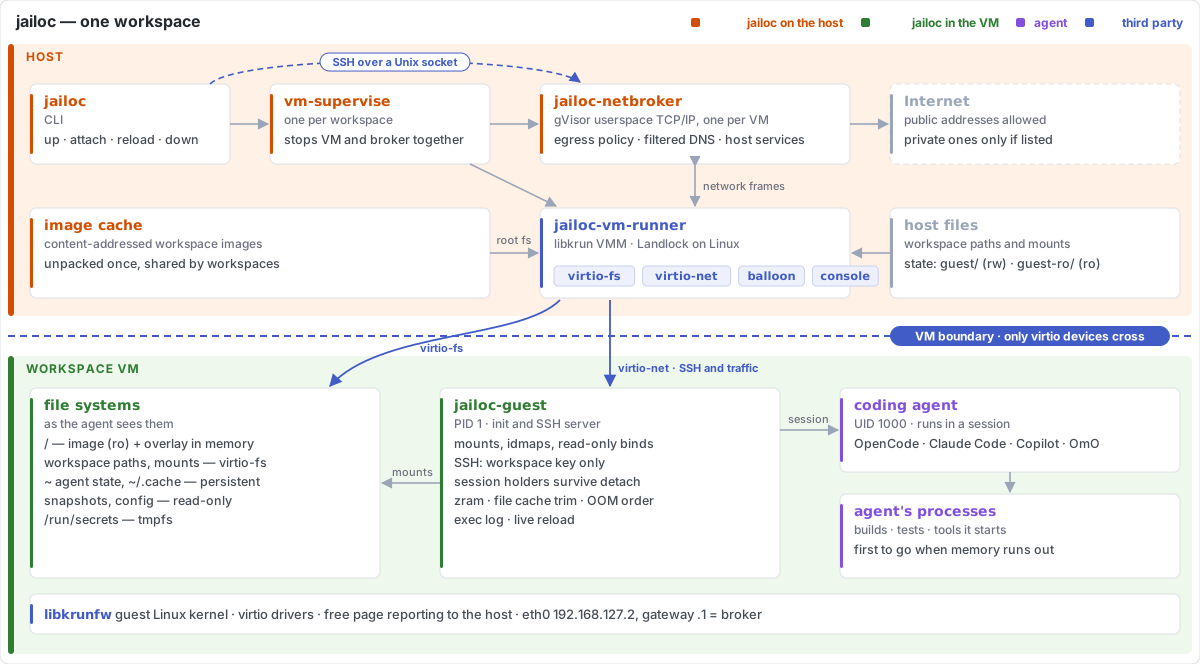
Every VM is owned by a detached supervisor process (jailoc vm-supervise). It starts the workspace's network broker, boots the VM through jailoc-vm-runner, waits until the guest is ready, and from then on keeps the two together: when either the VM or the broker exits, it stops the other. A workspace never runs without its broker.
The VM runtime (runner, libkrun and the libkrunfw guest kernel) is embedded in release builds of jailoc and unpacked into the cache on first use; builds without it need runner and lib_dir in the [vm] section. jailoc itself is built without cgo. jailoc-guest is pure Go and is embedded in jailoc, so a newly started VM always runs the guest of the jailoc version that started it. A running VM keeps its guest across jailoc upgrades: jailoc attaches to it as long as the guest speaks the same protocol, and asks for jailoc restart only after an upgrade that changed the protocol. Guest fixes of an upgrade take effect at the workspace's next restart.
Images
Workspace images are ordinary Docker images: the embedded Dockerfile, a [base] dockerfile preset and an optional per-workspace overlay (dockerfile, build_context). See Image Resolution. The image needs no entrypoint, command, exposed port or firewall setup, because jailoc-guest is the init.
[vm] builder decides where the build runs: the host Docker daemon, or a builder VM. The builder VM runs a pinned docker:dind image with a persistent data disk, reached through a Unix socket that its broker forwards into the VM. The finished image is exported and unpacked into a local image cache, and a builder VM shuts down afterwards.
Building on the host daemon is fastest, but Dockerfile RUN steps then run with container isolation and unrestricted host networking. A builder VM keeps build steps behind a VM boundary. All workspaces share one builder VM, with one build cache, and it reaches public addresses only. With isolated_build, a workspace gets a builder of its own, with a separate data disk and the workspace's allowed_hosts and allowed_networks, so one workspace's build steps can't read another workspace's build cache or private network access. Builds on the same builder are serialized.
Inside the guest
The VM boots from a small root file system that holds only jailoc-guest and its configuration, and the unpacked image in the image cache is shared into the VM read-only. jailoc-guest lays an overlay over the two and switches to it, with writes held in VM memory (swappable to compressed RAM), so files written outside the shares and the persistent home count against memory and are discarded when the VM stops. jailoc-guest prepares the system and then serves SSH:
- configures the network addresses, the broker as gateway and DNS resolver, and the hostname,
- sets the clock to host time and keeps it there: every 30 seconds it asks the broker's time service for the host clock and steps the guest clock when it is off by more than half a second, because the guest clock stops while the host sleeps,
- sets the time zone to the host's, or to
timezonewhen set: points/etc/localtimeat the zone in the image's/usr/share/zoneinfo, or copies the host's zone data into it when the image lacks that zone, and writes the zone name to/etc/timezone, - on Linux hosts, switches to idmapped mounts of the root filesystem and the shares, because libkrun's virtio-fs shows the real host owner of every file there: your user's files appear as root's in the root filesystem and as the agent's in the home and shared directories, and files the agent creates belong to your user on the host,
- creates the
agentuser (UID 1000) when the image has none, and its home directory, - mounts the shares, binds the snapshots (including the Git and agent configuration) and adds a forwarded CA bundle to the system trust store,
- adds the hostname to
/etc/hosts, - with
enable_docker, formats the Docker data disk (docker_disk, 20 GiB by default) on first use, mounts it at/var/lib/docker, grows its file system whendocker_diskwas raised and startsdockerdwith the socket owned by theagentgroup, - starts an SSH server that accepts only the workspace's key and runs every session as
agent.
jailoc-guest leaves privileges alone by default, so the agent can use sudo from the image. Root in the VM is still inside the VM boundary.
protect_git
With protect_git, jailoc-guest bind-mounts .git/hooks, .git/config and the Git files they point to (core.hooksPath, include.path, config.worktree) of every repository in the read-write paths and mounts read-only over themselves, turns the .git directories, the repositories and their parents into mount points that can't be renamed, and sets no_new_privs on all its threads. No session can then become root and undo the binds. Guest root could otherwise unmount them, which is why protect_git excludes sudo and enable_docker (Docker access is root access in the VM).
Sessions
jailoc opens a session by connecting to the guest's SSH server through a Unix socket that the broker forwards into the VM. It authenticates with a per-workspace key and pins the guest's host key, which is generated for every start. The agent runs in a session held by jailoc-guest: a small process inside the VM owns the agent's terminal, so the agent keeps running when the SSH connection ends. When a terminal re-attaches, the holder replays the terminal modes the agent had switched on (alternate screen, mouse reporting, bracketed paste, keyboard protocols) and makes the agent redraw. Sessions live in VM memory and end when the VM stops. See Manage sessions.
jailoc down asks the guest to stop over a control share, so open files are flushed before the VM powers off.
Memory pressure
When the VM runs out of memory, the kernel's OOM killer ends the process with the highest score, which is mostly its memory use. The agent is usually the largest process, but the memory pressure mostly comes from what it starts: test runs, builds, containers. Losing the agent ends the session and its in-flight work, so jailoc-guest, which runs as root, sets oom_score_adj for session processes:
| Process | oom_score_adj |
|---|---|
jailoc-guest init, session holders and attached jailoc-guest clients |
-1000: never killed, so the VM keeps running and a session can be reattached |
| The session program (the agent) | -500: killed only when it uses half of the VM memory more than any other process |
Processes the agent or jailoc-guest init starts outside a session |
0: the kernel default |
jailoc-guest init runs as the child of libkrun's init.krun, which powers the VM off when its child exits; without the exemption, an OOM kill of init would stop the whole VM. A forked process inherits its parent's oom_score_adj, and only root may lower it, while sessions run as agent. jailoc-guest follows process starts through the kernel's proc connector and resets every process the agent or init forks right after the fork, as well as any other forked process that inherited init's exemption, so the agent needs no changes. A child keeps its parent's value for the short time before jailoc-guest handles the event. Any program started in a session counts as an agent, including one the agent starts with jailoc-guest session open.
The kernel log lives in guest memory and is lost with the VM, so jailoc-guest copies every OOM kill to the console log as an out of memory: kernel killed a process line with the process, its PID, its anonymous memory and its oom_score_adj.
Files
Shares
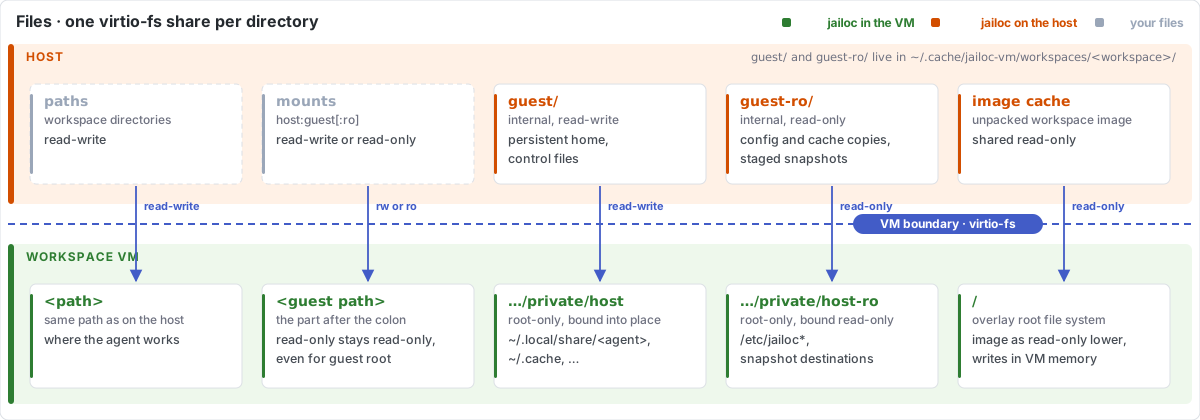
Workspace paths and the directories in mounts reach the VM through virtio-fs, one share each. jailoc's own data uses two internal shares. The VM's guest directory on the host is read-write and holds the persistent home directories and the control files the host and guest exchange. The guest-ro directory is shared read-only and holds copies of the workspace configuration and cache directories and the staged snapshots, so guest root can't change them either. The guest mounts both under a root-only directory and binds their parts into place. Because the guest can write the guest share, the host keeps nothing in it that it trusts, such as keys or the VM spec, and accesses it only in ways that cannot follow a link out of it. Few internal shares keep the number of virtio devices low; libkrun on x86_64 hosts can attach only about five shares besides them. Read-only shares are enforced by the VMM: guest root can't remount them writable. libkrun's virtio-fs server itself does not keep a guest inside a share, so on Linux the VM process runs under Landlock with access only to the shares, the VM's root filesystem, data directory and disks, the unpacked image (read-only), and the runtime (see Threat model). virtio-fs shares directories only, so a mounts entry that points at a single file isn't supported; use snapshots for files.
On macOS, shares use simplified ownership: every guest process sees shared files as its own, and files it creates are owned by the host user. Permission bits stay meaningful on the host, and ownership changes inside the guest have no effect on host files. On Linux, the guest sees the host owner and group of shared files. libkrun creates files as the host user that runs jailoc and allows it only for guest root or for a guest user whose uid and gid match that host user, so the agent user (uid and gid 1000) can create files in shares only when jailoc runs as uid and gid 1000.
Snapshots
Files and directories in snapshots, and the Git and agent configuration, aren't shared. jailoc copies them into the read-only internal share when the VM starts and on every jailoc reload, and the guest binds each item read-only at its destination. Each reload copies into a new directory and the guest replaces its binds; processes that opened a file earlier keep reading the old copy. Nothing the workspace does reaches the host original.
Persistent home
Only the state directories of the workspace's coding agent (for OpenCode ~/.local/share/opencode and ~/.local/state/opencode, for Claude Code ~/.claude) and ~/.cache survive a restart. They live in ~/.cache/jailoc-vm/workspaces/<workspace>/guest/home on the host, next to the Docker data disk of enable_docker. jailoc down --purge deletes them.
Secrets
Secrets never touch the root file system or a share. jailoc reads them on the host, sends them over SSH after the VM starts, and jailoc-guest writes file secrets to /run/secrets, an in-memory file system readable only by agent, and env secrets to the in-memory session environment. See Secrets.
Network
The VM has exactly one network interface, and its only peer is the workspace's broker on the host. The broker runs a userspace TCP/IP stack (gVisor), serves DHCP, DNS and the host clock (SNTP) on the gateway, and checks every outgoing TCP connection and UDP flow against the workspace policy before it opens a host socket. See Network Isolation.
The broker also carries a few host services: the SSH and Docker sockets for jailoc, the host SSH agent when ssh_auth_sock is on (exposed in the guest as /run/ssh-agent.sock, keys never enter the VM), the host gpg-agent extra socket when gpg_agent is on (exposed as /run/user/<uid>/gnupg/S.gpg-agent), ports, which publish guest ports on host 127.0.0.1, and host_ports, which relay guest connections on the gateway to host loopback ports or Unix sockets. jailoc-guest mirrors each host_ports entry on guest loopback and maps host.jailoc.internal and host.docker.internal to the gateway in /etc/hosts.
Trade-offs
- Start time: the first start builds and exports the image. Later starts reuse the cache; a builder VM has to boot before it can check the cache.
- Resources:
cpuandmemorysize the whole VM, including its Docker daemon. Nothing limits processes inside it. A build in the builder VM adds the builder's own CPU and memory. See Resource use. - Docker inside the VM: with
enable_docker, containers share the VM's CPU, memory and network rules. - Platform: darwin/arm64, linux/amd64 and experimental linux/arm64 (on Linux with access to
/dev/kvmand Landlock, Linux 5.19 or later). Release builds embed the go-microvm runtime for these platforms; other platforms and builds from source need a self-built runtime set through[vm] runnerand[vm] lib_dir.