jailoc 2: every agent gets its own computer
November 2026 · release 2.0
jailoc 1 put your coding agent in a Docker container. That was a good fence, but it was a fence made of the host's own kernel, with the Docker daemon on the other side of it. jailoc 2 removes the shared kernel: every workspace boots its own micro-VM, and the agent lives there. This post is a tour of everything that changed along the way.
TL;DR
- Every workspace is a libkrun micro-VM with its own kernel, on macOS (Apple Silicon) and Linux (KVM).
- Pick your agent: OpenCode 2, OpenCode 1, Claude Code, GitHub Copilot CLI or OmO, or a variant you define yourself.
- Sessions detach and reattach like tmux, and survive closed terminals.
- A host-side network broker sees every packet.
jailoc trafficshows you where the agent went, andjailoc straceshows what it ran. - Most config changes apply to a running VM with
jailoc reload. - Coming from v1? Run
jailoc migrate.
A VM per workspace, not a container
Each workspace gets a VM booted with jailoc-guest as its init. Your project directories are shared in over virtio-fs at their original paths. Everything else on the host, like ~/.ssh, your browser profiles and other projects, simply doesn't exist inside.
You don't install a hypervisor stack. Release binaries embed the VM runtime (the VM runner, libkrun and libkrunfw) and unpack it on first use, so nothing is downloaded. Docker on the host is only needed to build workspace images. With isolated_build = true, even that moves into a builder VM of its own.
jailoc up my-project    # build the image, boot the VM
jailoc                  # open the agent in the current directory
The first start builds the image. Later starts reuse the build cache and take a few seconds.
Read more: Architecture, Overview.
Bring your own agent
jailoc 2 is no longer an OpenCode-only tool. Set agent per workspace:
agent |
Runs |
|---|---|
opencode / opencode2 (default) |
OpenCode 2 |
opencode1 |
OpenCode 1 |
claude |
Claude Code |
copilot |
GitHub Copilot CLI |
omo |
OmO |
Each agent runs in full-autonomy mode, since the VM is the guardrail. Need a twist? Pin a version, add arguments, or derive a custom agent with its own name:
[defaults.agents.claude-opus]
from = "claude"
args = ["--model", "opus"]

[workspaces.my-project]
paths = ["~/projects/my-project"]
agent = "claude-opus"
Agent state such as logins and conversation history lives in a persistent home that survives VM restarts. By default each workspace has its own. With profile = "<name>", several workspaces can share one; with profile = false, every start is a clean slate. Several workspaces can also point at the same project, so you can run Claude Code and Copilot CLI side by side on one repository.
Every agent shows a workspace indicator, so you always know which sandbox you're typing into.
Read more: Coding Agents, Workspace Indicator.
Sessions that outlive your terminal
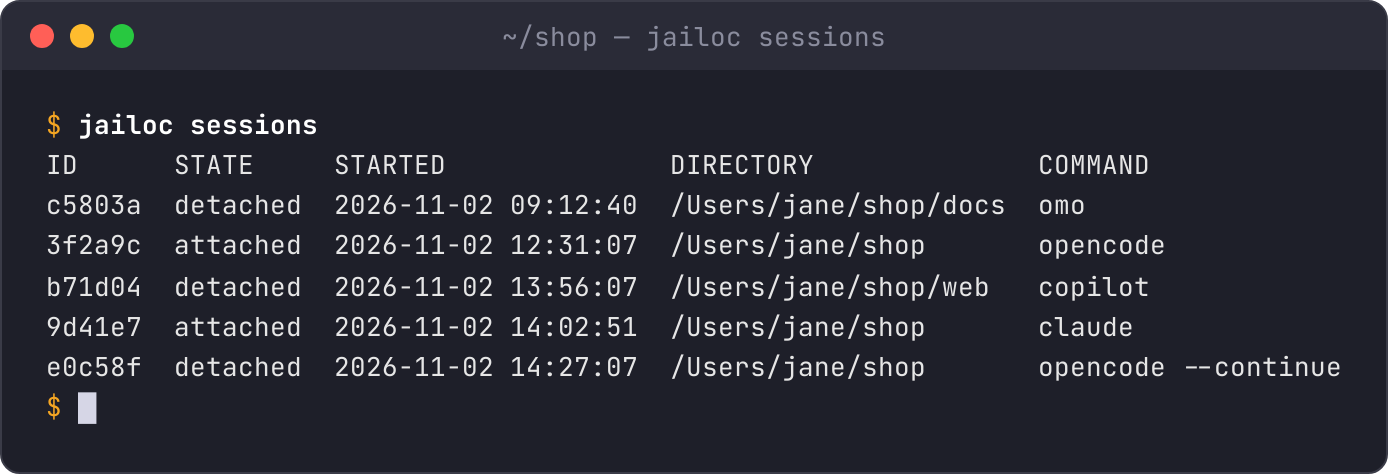
The agent runs in a detachable session inside the VM. Press Ctrl-b, then d (configurable with detach_keys), or simply close the terminal: the agent keeps working. Run jailoc in the same directory and you're back where you left off. Attaching from a second terminal takes the session over.
jailoc sessions              # what's running in this workspace?
jailoc --attach 3f2a         # jump into a specific session
jailoc -c                    # new session continuing the last conversation
jailoc sessions stop 3f2a    # end one
Read more: Sessions.
A network broker with opinions
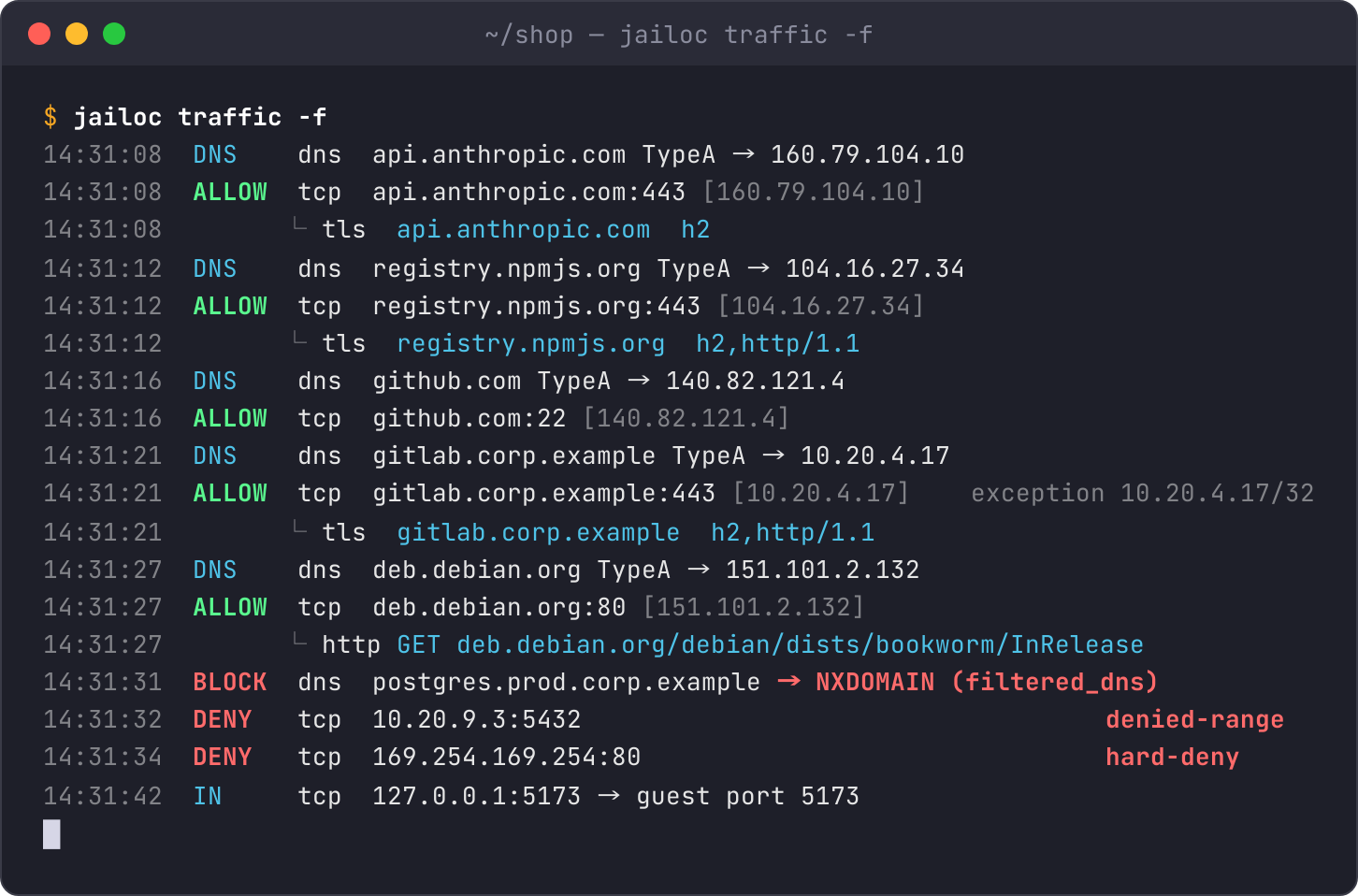
Every packet the VM sends goes through jailoc-netbroker, a userspace network stack built on gVisor that runs on the host, one per workspace. Public internet: allowed. Private and reserved ranges (your clusters, databases and cloud metadata endpoints), over IPv4 and IPv6 alike: denied, unless you list them in allowed_hosts or allowed_networks. Add filtered_dns and internal zones stop resolving at all.
Two escape hatches, both explicit:
portspublishes a guest port on host127.0.0.1, for the dev server the agent just started.host_portsrelays a host loopback port or Unix socket into the guest, for a local MCP server for example. jailoc warns when you point it at something dangerous like Chrome DevTools ordocker.sock.
Read more: Network Access, Network Isolation.
See what the agent did
Sandboxing is good. Knowing what happened inside the sandbox is better.
jailoc traffic -f    # live connections, DNS answers, TLS server names, HTTP method + path
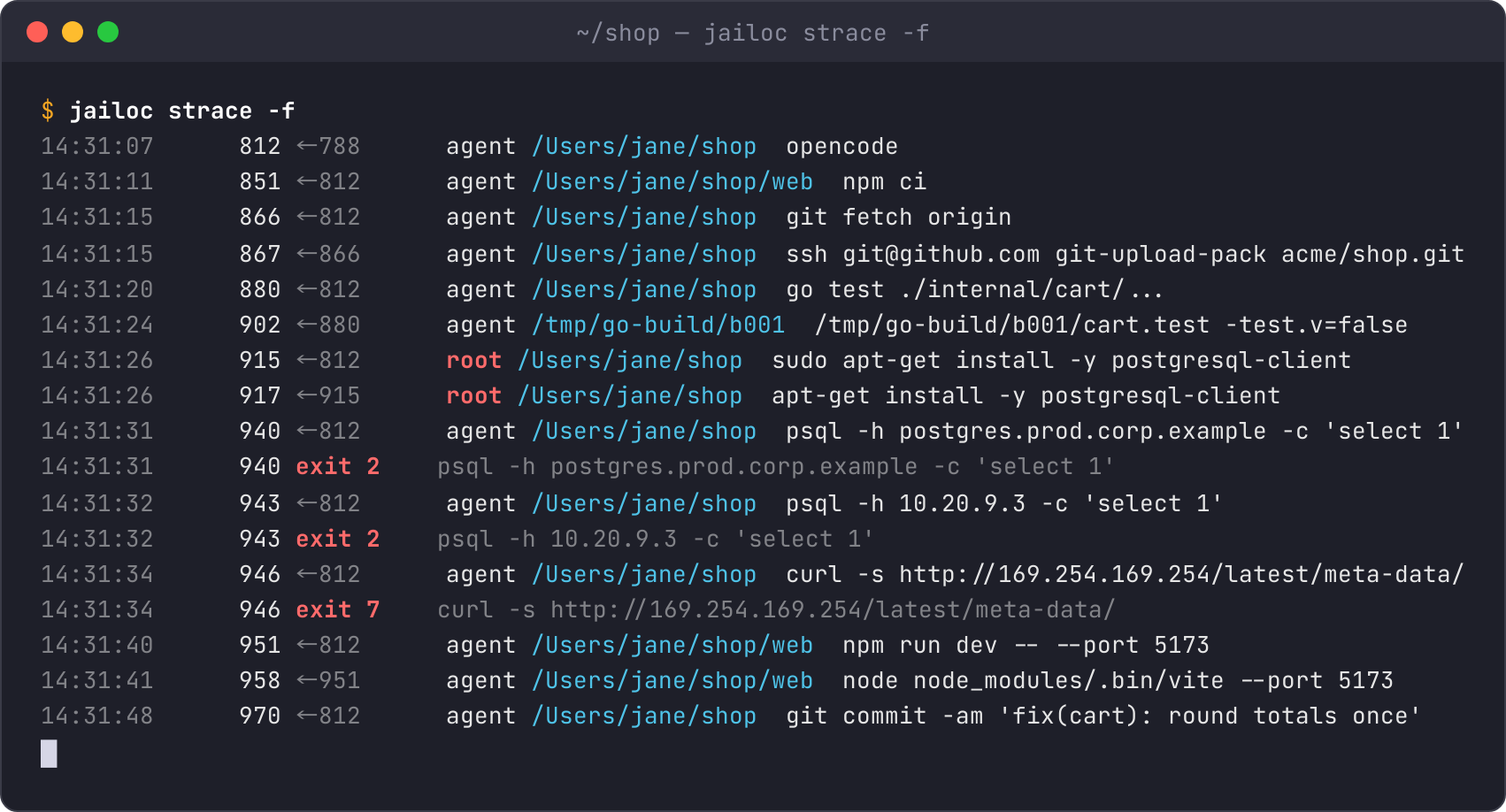
jailoc strace -f     # every process started in the VM, and every one that failed
traffic reads the broker's log, so it also lists denied connections and what was blocked by DNS filtering. Here the agent reaches the model API, npm, GitHub and an internal GitLab listed in allowed_networks, then tries the production database by name (blocked by filtered_dns), by IP (denied range) and the cloud metadata endpoint (always denied):
strace records every process start from boot, with parent, user, working directory and full command line, plus the exit status or signal of every process that failed, so the same session reads as a story:
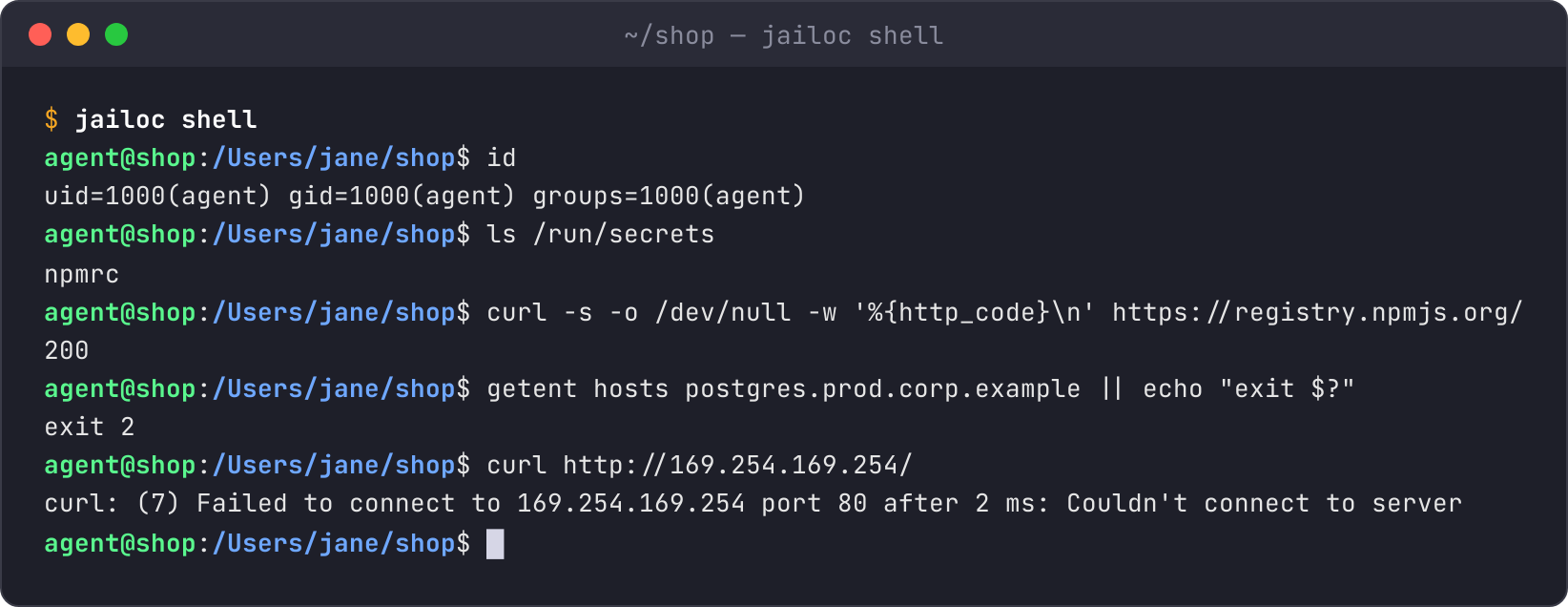
For the times you want to look yourself, jailoc exec -- <cmd> runs a command as the agent user, and jailoc shell drops you into a login shell. Both get exactly what the agent gets: the same user, the same shared directories at their host paths, the same secrets and the same network policy, so you can check what the agent can reach before it tries:
Read more: CLI Reference.
Change config without rebooting
Edited config.toml? jailoc reload applies the network policy, published ports, the SSH agent, the CA bundle, snapshots, env and secrets to the running VM, without interrupting the agent. Settings that really need a new VM (shares, CPU, memory, Docker) are listed, and jailoc restart applies them.
jailoc status tells you when the running VM has drifted from the config, along with the agent version, resources and session count. jailoc list gives the whole fleet at a glance, and --all works on up, down, restart, reload and status.
  WORKSPACE  AGENT      STATE    SESSIONS        PATHS
  default    opencode   running  0               ~/projects
* myproject  claude     running  2 (1 attached)  ~/projects/myproject
  scratch    opencode1  stopped  -               -
Read more: Workspace Configuration.
Docker, but inside the box
Agents love docker run. Handing them the host's docker.sock hands them the host. With enable_docker = true, jailoc runs dockerd inside the workspace VM, so containers the agent starts stay in the sandbox. It's opt-in, and the image only gets Docker when you ask for it, which keeps everyone else's image lean.
Guard your Git
A compromised agent doesn't need to exfiltrate anything if it can plant a Git hook that runs on your host the next time you commit. protect_git = true makes .git/hooks, .git/config and worktree pointers read-only inside the VM, and turns off sudo and Docker so they can't be remounted.
Secrets that don't touch the disk
Secrets come from a host environment variable, a file, or a command such as your password manager:
[workspaces.my-project.secrets.env.NPM_TOKEN]
from_command = "op read op://dev/npm/token"
jailoc reads them on the host and pushes them over SSH. Env secrets go only into the session environment; file secrets land in /run/secrets on tmpfs. Rotate them with jailoc reload.
Read more: Secrets, Secrets architecture.
Small things that add up
- Memory that copes: zram swap and periodic reclaim in the guest, and the agent is the last process the OOM killer picks.
sudoin the VM: the agent canapt-get installwhat it needs, inside its own machine.- Read-only snapshots: copy files such as your Git config or
known_hostsinto the VM instead of sharing them live. - Faster builds: BuildKit with cached apt and npm downloads, plus pruning of images you no longer use.
- Another config file:
--configorJAILOC_CONFIGpoints jailoc at a differentconfig.toml.
Upgrading from v1
Breaking changes
- The Docker backend, remote mode and the published OpenCode port are gone. v1 settings (
mode,password_mode,expose_port) fail config load. mountsmust be directories: the VM shares directories only. Move single-file mounts tosnapshots.enable_dockerdefaults tofalse, and Docker runs inside the VM instead of a sidecar container.- The base image doesn't contain OpenCode; jailoc installs the selected agent in a separate layer.
One command handles most of it:
jailoc migrate --dry-run   # preview
jailoc migrate             # convert config, stop v1 containers, copy OpenCode data
Your OpenCode 1 sessions and logins carry over. Set agent = "opencode1" to keep using them.
Read more: Migrate from jailoc v1.
Try it
Install jailoc, then follow Getting Started. Your first sandboxed agent is a couple of commands away.